Monday, February 28, 2011

EtsyMetal Charm Swap 7 !!!

Hi my name is Victoria Takahashi. Shannon Conrad and I will be hosting this new round of EtsyMetal Charm Swap! I will be blogging and Shannon will be receiving and shipping. This will be the teams' 7th charm swap to date. As we go, we will be reporting on our progress. It is always an exciting venture to watch the pieces come to life as the weeks slip by.

The ideas are starting to come in.  Below is the first sneak peak of ideas of what some of our participants will be making!

A little bit of history about our EtsyMetal Charm Swaps:
Currently we have completed 6 bracelet swaps to date. (see picture above)
It all began in August 2007 when I was wanting to trade a little piece of art in form of a charm with anyone who wanted one from me, so I did a shout out to my fellow team members for this desired trade. It sprang to life all on its own, slowly defining and becoming a reality and a really fun collaboration of metalsmiths. It really is a joyous feeling to be able to have a small piece of art from new and old friends. And so we have continued having these swaps, we plan to have them twice a year as of right now. Each swap having a maximum of 20 participants each.

At the end of the swap a completed bracelet and extra individual charms will be available in our EtsyMetal Team shop. To date, Bracelets 1 through 4 have been sold, and bracelets 5 and 6 will be listed in our team shop soon!
Half of the proceeds collected upon sale of the bracelet will go towards our EtsyMetal Youth Outreach Program. We will donate 50% to curators choice of a Youth Art Organization.


Shannon Conrad of RubyGirl
is thinking of making these cute little Hare charms possibly out of Shibuichi!


Meg Auth of SimplyMegA
is thinking of making sweet little shell charms like her earring above for this swap!

 Andrea Ring of AmuckDesign
is making a charm along the lines of these awesome earrings above for her charm!

...and I, Victoria Takahashi of Experimetal
 will be making an articulated bird charm. My prototypes are mocked up and I am currently working all the little kinks out!

Other members who have checked in this week:
Shae Freeman of CitizenObjects says, "I have three different ideas and piles of parts for all of them!"
Sue Szabo of LSueSzabo says, "I haven't started mine and I'd better get it into gear."
Ann Jenkins of Tuizui says, "She is getting to work!"
Thank You for reading and please stay tuned for our upcoming progress reports!

Monday, February 14, 2011

Creating a cutting stamp using the RT Blanking System.

 An RT Blanking Saw.

The Roger Taylor Blanking System, otherwise known as the RT Blanking System, is a very useful kit for the creation of your own, inexpensive steel cutting and pressing stamps. You can cut sheet silver, copper, gold, gilding metal, brass and other materials such as papers and cards, creating infinite identical cuts of your design, in just a few moments each time. However, the creation of the stamp involves sawing through carbon tool steel on an angled table through a sawing process that is not as easy as straightforward sawing with a jewellers saw. It costs a couple of hundred pounds to buy the kit which includes the saw and materials and takes a fair bit of time and practice to get the hang of using the RT blanking saw. The process of cutting through the tool steel is slow and arduous, but well worth the initial outlay if you are needing to produce many dozens or hundreds of a particular shape, over and over again. Here, I outline the procedure in its most basic form....

Above you can see a sheet of 0.7mm copper with jelly bean blanks stamped out of it, there's just a little tidying up of the shape to do, but even this is unnecessary if the stamp had a shape cut out of it in two parts (which is explained in detail in the instruction book that come with the saw purchase). Notice one jelly bean has been created as a depressed 'emboss' instead of being stamped out, this is because the metal was inserted incorrectly into the steel stamp, I'll come to that later.

 Here is the basic jelly bean steel stamp with a piece of un-annealed copper in it, ready to be cut out. If the copper was annealed, then it wouldn't cut cleanly every time, instead it would stretch in places.

Here is the copper ready to be cut, inserted in the blanking stamp. It is on a steel block and another piece of steel is about to be placed ontop, so the die (stamp) is sandwiched between steel...

 ...before being given a few firm blows with a hammer. The cutting die is pressed down into the copper and the jelly bean shape is blanked out.


 To make the hardened tool steel cutting stamp, the design is drawn onto the surface with a starting drill hole (on the right-hand side) and an end point hole. There is no less than 1cm of steel surface area around the shape, between the holes and the edge of the steel. There are more detailed instructions about design placement in the instructions that come in the kit. There is a cleverer way of cutting out the 'splat' shape above so that there is no need to finish off the last section but for this article I won't go into that. Note the angle of the sawing table in relation to the saw blade.

 When the design has been sawn, you push it up slightly so that the smaller surface area-side is the top. You can just see here the angled cut. This would blank out your shape. If you pushed it through the other way so that the larger surface area is on top, then you would create an embossed depression as shown in an earlier picture. It is this precisely worked-out angle, which is so important for creating an effective cutting tool.

The handle is lost on this saw, but here you can see a student having a go at sawing by sliding the saw up and down on its fixed post. The blade runs through the steel and a slot in the table. The steel is gradually pushed into the teeth of the blade rather than pushing the sawblade forward into the metal as you would do traditionally.

To insert the blade into the saw, you slacken the tension on the saw frame (compress it) by turning the threaded bar around.

The blade is inserted into the pads and tightened into place with the allen-key. Same applies at the top of the frame before tightening the blade tension by opening up the frame with turns of the threaded bar again.

The next thing we need to do is to adjust the sawing table to the correct tilt and that's what this chart is for. In this example, I have a piece of tool steel which is 1.00mm thick. I find 1.0 in the top of the chart and read down that column to find that there are letters in 2 white squares and a letter in 1 partially shaded square. Those 3 squares align to blade sizes in the lefthand column of 6/0, 4/0 and 2/0. The clear white squares have the letters P and T in them, the partial shaded square says letter Z. This tells me that for 1mm tool steel I should choose to saw my design out with either 6/0 or 4/0 blades. I could get away with using a 2/0 blade but results might not be ideal as the cut would be a little too wide in relation to the thickness of the steel. I chose 4/0 as this is what I usually saw with for most jobs anyway, if I cross reference 4/0 blade choice with 1mm steel then I am given the letter "T"...what does this mean?

Using a second chart, I find a specific line which has a "T" labelled to it, and I line up my blade exactly with the "T" line on the chart by loosening the sawing table and adjusting the angle of it. The table loosens with another allen-key screw at an obvious pivot point.

So, here you can see that my blade - which I have replaced with a copper wire only so that you can see it in this photograph - is perfectly aligned with the line marked "T". Now I can saw out my blanking tool, as you saw earlier.  What you do next with your flat blanks is up to you as usual....they don't have to stay flat, do they?!

There are many more uses for these steel blanks which are explained here by a company who actually make the blanks for you, if you can't face making them yourself or do not wish to purchase an RT Blanking system kit yourself. In todays era of lasercutting technology, I think there is still a place for tools like this in the small workshop.

Monday, February 7, 2011

EtsyMetal Blog Carnival 2.7.11: Non-Metal/Jewelry Creativity


February's Blog Carnival is here!
The topic is:
Tell us about other kinds of art and craft you do. What other media do you work and play with? How often do you get to create? Does it relate to or inspire your metalworking?

Tuesday, February 1, 2011

February Challenge - "That's new to me"

Erin Austin Our February team challenge was
"That's new to me" 
Make something totally new to you (i.e. new technology, new technique, thing you never did and so on...).
If you fill like sharing please tell us about your experience in few lines.....


 "This is my first attempt at making a cut-out in the back of a bezel. I like it! The ring is pretty comfy too. Man, I think I'm getting the hang of making rings a little more!!!"
***


" I've never before done a turtle setting, not that they're hard but just never had a project that called for that style. This one did. I've been playing with the idea of embroidering through metal for a LONG time and this finally popped out."
***


"Here's my "first time I've tried it" entry for working with sheet pewter and soldering it together. Inspired by my cluncky damaged left knee which is soon to be operated upon. There are 3 forged forms soldered together. The small dome is soldered from the back into a hole sawn into the largest form. Shaped with Bossing Mallet and BallPein hammer, textured with BallPein and Creasing Hammer and a grit-blaster. I already do lots of casting with Pewter such as 3 and 4-part cuttlefish moulds for 3-D pieces and 2-part sand cast moulds for making 3D pieces, but I've never ever worked with sheet or soldered it. I found the forming lots of fun, it's beautiful stuff to work with but I failed at fusing it (melted 2 pieces altogether) and my soldering here, is not great. I'll need lots of practice and a finer flame. I have a couple of books I'm referring to, but being used to high silver soldering temperatures, I think that soldering and fusing pewter will take me a while to learn. "
"Here is a 2nd "first time ever tried" experiment. I learned to crochet over Christmas (my metals workshop was frozen over, so I was stuck in the house). These are my first ever, tentative efforts at 3D forms in crochet. Since these, I have become addicted to the calming activity of crochet and I've made 3 hats, a skirt and am now into a jumper. I will come back to crochet in wire in the future. "
***


"Today I tried out the origami pleat fold in metal for the first time. It was quite the challenge to get the final shrimp form as I started with 26 gauge and was folding 4 layers at the end. I need to remember to think about what gauge I'll be dealing with in the final folds when selecting the starting gauge. The smaller ring is out of 30 gauge and was really fun to make. "
***


"Playing with inlay + rolling mill + patina + hammer 

I love the rough look"
***

Our March Challenge due to February 28th is:
"Space"
The first Spacewalk by Soviet Cosmonaut was on March 18th, 1965

Tuesday, January 18, 2011

How to make a Collet mount.


This is very much like the rub-over bezel mount with an open back that I showed you here, but with an elegant taper for faceted stones only and produced with the help of a collet block. 


What's a collet block?...it is a steel block with tapered cone-shaped depressions and a matching punch, for stretching tube sections into cone shapes for your mounts, or as in this case for tidying up a pre-fabricated cone shaped setting. These blocks come in different shapes for a variety of mount styles, such as oval.

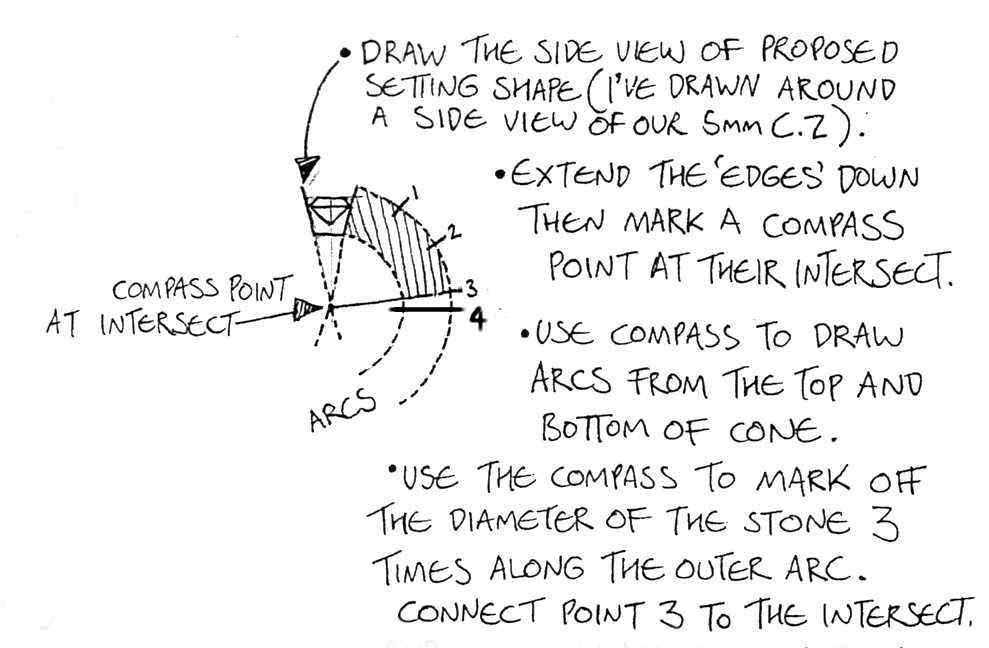
So, first I made my template and then I marked that onto my metal. I used aabout 0.9mm thick metal, which is quite thick, but you will see why that is, later. How did I get the template right? There are lots of methods listed in so many books on how to do this and they all differ. Here is the way I do it, which you can see in my sketch below;


You can see that I have drawn the width of the stone as it actually is, which in this case was 5mm. The two lines which I then brought down (that long "V" down to a point) define the taper of the mount, so a shorter fatter V gives a squat mount and a longer V gives a more tapered, cone. It's helpful after you have drawn the arc, to also add the thickness of the metal you're using, onto that too, so that the final template you cut out is the whole of the shaded section  and the extra bit up to where it's marked number 4. This technique works for me every time.


Next, I sawed out the shape and made sure that edges were neat. I used my round nose pliers to bend the shape for my mount around, until the edges met perfectly. Once you have a good flush join, solder it closed with Hard solder. After pickling, you get to put your mount into the collet block and use your punch to true up the form. Which hole do you use though?....well, which one does your stone sit in nicely that leaves the table of the stone a couple of mm below the surface of the block?....choose the next size of hole up from that one.

Now make sure the stone fits the mount. You need a couple of mm proud of the stone table (the "table" is the top, flat surface of the stone). The mount is then soldered into the jewellery item, again with Hard solder.

Now you need to grind away a seat for the stone to sit on, just like we did for this mount.  Here in the above photo' you can see that I have coloured in the inside of the mount with black felt-tip pen, so that I can easily see the mark that I have scribed with my dividers which indicates where I will be cutting the seat.

 
I used both these burrs to grind out the seat. You may find that just one suits you better than the other. Because I have Carpal Tunnel syndrome in my wrists, I find this procedure quite difficult and a little painful, so I tend to grind out a little too much in my quest and for that reason, I prefer to solder a constructed seat into my settings, as in this setting. In this case, I might make another cone to a slightly smaller template and solder it inside. Then I would thin down the top edge of the outer cone, so that it is thin enough to rub over, but for the purpose of this tutorial, I will carry on cutting!....


Further shaping was achieved by using a medium sized, fine flat file, to take the height of the mount down until it is lower than the table but above the girdle (the "girdle" is the widest edge of the stone) so that I have enough metal to rub over. You can see here that the edge of the mount is now nice and thin from having the seat ground down. At this stage in the photo, I still have to take the height down a bit, as there is too much metal to push over.

You can see the ring is now held firmly in the Ring Clamp and I am pushing the edge over from opposite points with my pusher, bit by bit until the edge is snug against the stone all around. Only then do I push any visible lip down against the stone in a downwards push, before finally rubbing around in one direction with my burnisher....just as we did at the end for this setting. 

In case you're not sure, this gizmo above, is a ring clamp and makes holding rings while you set stones a much easier job than simply holding the ring with your hand.

So here is the mount after pushing, but before burnishing and below you can see the mount after burnishing.


Job done. Do remember that this is just one way of making this mount, there are variations. Every jeweller has a different way of doing it and has tips to share...good luck!

How to make a Collet Bezel Mount.


This is very much like the rub-over bezel mount with an open back that I showed you here, but with an elegant taper for faceted stones only and produced with the help of a collet block. 


What's a collet block?...it is a steel block with tapered cone-shaped depressions and a matching punch, for stretching tube sections into cone shapes for your mounts, or as in this case for tidying up a pre-fabricated cone shaped setting. These blocks come in different shapes for a variety of mount styles, such as oval.

So, first I made my template and then I marked that onto my metal. I used aabout 0.9mm thick metal, which is quite thick, but you will see why that is, later. How did I get the template right? There are lots of methods listed in so many books on how to do this and they all differ. Here is the way I do it, which you can see in my sketch below;


You can see that I have drawn the width of the stone as it actually is, which in this case was 5mm. The two lines which I then brought down (that long "V" down to a point) define the taper of the mount, so a shorter fatter V gives a squat mount and a longer V gives a more tapered, cone. It's helpful after you have drawn the arc, to also add the thickness of the metal you're using, onto that too, so that the final template you cut out is the whole of the shaded section  and the extra bit up to where it's marked number 4. This technique works for me every time, but other folk have their own preferred methods which differ.


Next, I sawed out the shape and made sure that edges were neat. I used my round nose pliers to bend the shape for my mount around, until the edges met perfectly. Once you have a good flush join, solder it closed with Hard solder. After pickling, you get to put your mount into the collet block and use your punch to true up the form. Which hole do you use though?....well, which one does your stone sit in nicely that leaves the table of the stone a couple of mm below the surface of the block?....choose the next size of hole up from that one.

Now make sure the stone fits the mount. You need a couple of mm proud of the stone table (the "table" is the top, flat surface of the stone). The mount is then soldered into the jewellery item, again with Hard solder.

Now you need to grind away a seat for the stone to sit on, just like we did for this mount.  Here in the above photo' you can see that I have coloured in the inside of the mount with black felt-tip pen, so that I can easily see the mark that I have scribed with my dividers which indicates where I will be cutting the seat.

 
I used both these burrs to grind out the seat. You may find that just one suits you better than the other. Because I have Carpal Tunnel syndrome in my wrists, I find this procedure quite difficult and a little painful, so I tend to grind out a little too much in my quest and for that reason, I prefer to solder a constructed seat into my settings, as in this setting. In this case, I might make another cone to a slightly smaller template and solder it inside. Then I would thin down the top edge of the outer cone, so that it is thin enough to rub over, but for the purpose of this tutorial, I will carry on cutting!....


Further shaping was achieved by using a medium sized, fine flat file, to take the height of the mount down until it is lower than the table but above the girdle (the "girdle" is the widest edge of the stone) so that I have enough metal to rub over. You can see here that the edge of the mount is now nice and thin from having the seat ground down. At this stage in the photo, I still have to take the height down a bit, as there is too much metal to push over.

You can see the ring is now held firmly in the Ring Clamp and I am pushing the edge over from opposite points with my pusher, bit by bit until the edge is snug against the stone all around. Only then do I push any visible lip down against the stone in a downwards push, before finally rubbing around in one direction with my burnisher....just as we did at the end for this setting. 

In case you're not sure, this gizmo above, is a ring clamp and makes holding rings while you set stones a much easier job than simply holding the ring with your hand.

So here is the mount after pushing, but before burnishing and below you can see the mount after burnishing.


Job done. Do remember that this is just one way of making this mount, there are variations. Every jeweller has a different way of doing it and has tips to share...good luck!
Related Posts Widget for Blogs by LinkWithin
 
>